Overview
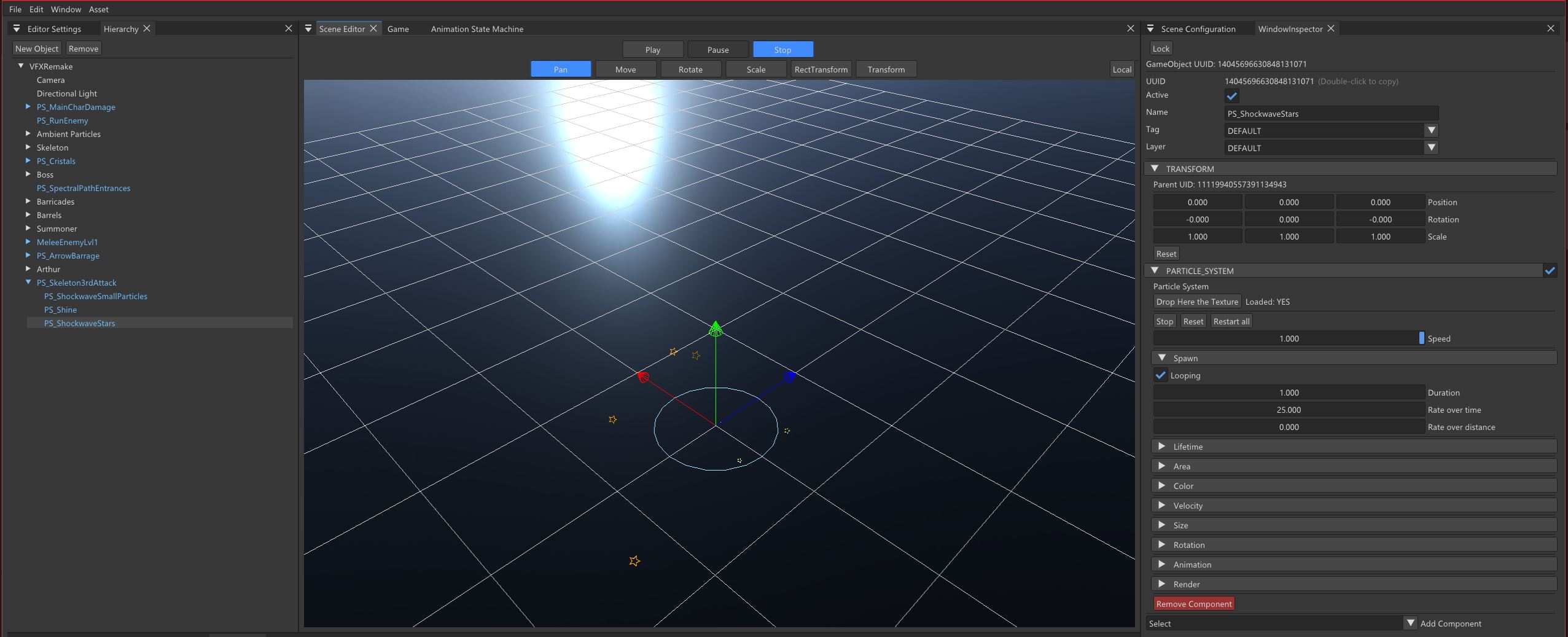
A Particle System is a system used to create visual effects by simulating a large number of small elements called particles. Each particle has its own position, lifetime, movement, size, rotation, colour and other properties that can change over time. At their core, particles are usually just textures rendered in the 3D world.A very common technique is to use them as billboards, meaning that the particle always faces the camera. Although each particle is only a flat 2D image, the combination of its movement, animation, scaling, rotation, transparency and blending can create the illusion of volume and depth.
This simple technique is one of the reasons particle systems are so useful for creating the visual effects we see constantly in video games. Fire, smoke, sparks, dust, explosions, magic effects and many other effects can be represented using relatively simple textured planes. When hundreds or thousands of these particles are combined and updated over time, they can create a much more complex and convincing visual result.
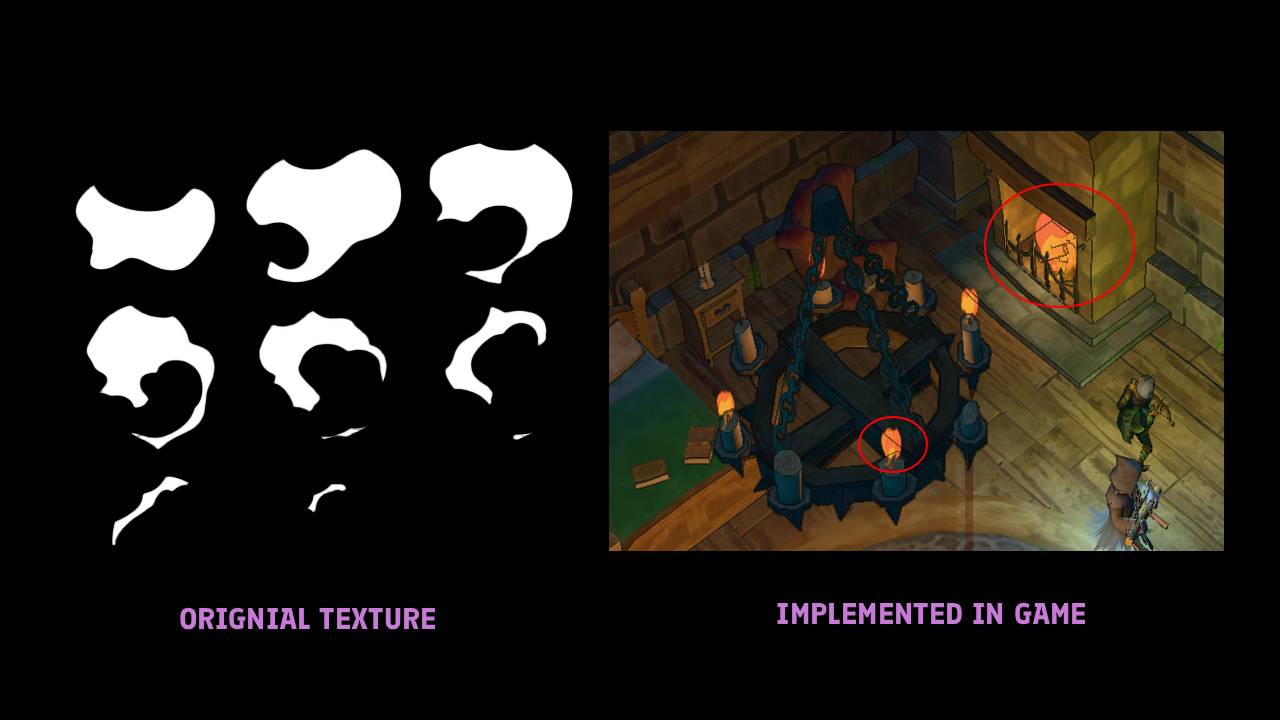
Instead of manually creating every part of an effect, a particle system allows us to define a set of rules that control how particles are created, updated and rendered. By combining these rules, we can create many different effects while reusing the same underlying system.
For example, a fire effect can be represented by particles that are spawned continuously from a small area, move upwards, change their size and colour over time, and disappear after a short lifetime. Each individual particle is very simple, but when many of them are combined, they create the illusion of a dynamic flame. Particle systems are one of the most common tools used to create visual effects in games. However, the final result can hide a significant amount of work happening every frame. A particle system may need to create, update, sort and render hundreds or thousands of particles simultaneously.
Because of this, how particles are stored and managed becomes an important part of the system’s design.
Our particle system is built around two main ideas:
- Pooling, to avoid constantly allocating and destroying particles.
- Modularity, to allow different behaviours to be combined without creating a completely new system for every effect.
This gives us a flexible system where an emitter can control where particles spawn, how long they live, how they move, how they change over time and how they are rendered.
Architecture
The particle system is divided into several layers, with each one having a specific responsibility. At the top level, ModuleParticleSystem manages the global particle pool and coordinates the update and rendering processes. Every GameObject that uses particles contains a ParticleSystemComponent. This component owns a ParticleSystem, which can contain one or more ParticleEmitters. Each emitter is composed of several ParticleModules. Each module is responsible for a specific part of the particle’s behaviour. This makes it possible to combine modules depending on the effect we want to create.
ModuleParticleSystem
ModuleParticleSystem is the central manager of the particle system. It maintains a global pool containing all the particles used by the engine. Instead of creating a new Particle every time an emitter spawns one, the system requests an available slot from this pool.
This approach reduces the number of memory allocations performed during gameplay and gives us a predictable maximum number of particles. The pool is limited by MAX_PARTICLES.
The Particle Structure
Each particle stores the runtime information required by the different modules.
struct Particle {
    Vector3 position;
    Vector4 colorAndAlpha;
    float rotationZ = 0.f;
    Vector2 scale;
    float textureFrame = 0.f;

    float velocity;
    float rotationVelocity;
    bool flippedRotation;
    Vector3 movementDirection;
    float addedGravityVelocity;

    Vector2 startScale;
    Vector2 endScale;
    float startLifeTime;

    float lifeTime = 0.f;

    EmitterInstance* owner;
    bool isNew;
    unsigned int vectorPosition;
};
The structure contains both visual and simulation data.
For example, position, colorAndAlpha, rotationZ and scale are used when rendering the particle, while velocity, movementDirection and lifeTime are used to update it.
The particle also stores information about its owner. owner, isNew and vectorPosition allow the system to keep track of the emitter that currently owns the particle and its location inside the emitter’s lists.
Particle Pool
The global particle pool is one of the main performance considerations of the system. Instead of allocating and destroying particles continuously, we keep a fixed-size pool and reuse its slots. When an emitter needs a new particle, it requests a slot through ModuleParticleSystem.
int ModuleParticleSystem::requestPoolSlot(EmitterInstance* newOwner) {
    if (m_freeSlots.empty()) {
        int slot = m_firstUsed;
        m_firstUsed = (++m_firstUsed) % MAX_PARTICLES;

        m_pool[slot].owner->eraseIndexOnLocation(
            m_pool[slot].isNew,
            m_pool[slot].vectorPosition
        );
        m_pool[slot].owner = newOwner;
        return slot;
    }
    int slot = m_freeSlots.back();
    m_freeSlots.pop_back();
    m_pool[slot].owner = newOwner;
    return slot;
}
If there are free slots, one is taken from m_freeSlots. If the pool is full, the system reuses an existing slot using m_firstUsed. Before the slot is reassigned, the previous owner is notified so that the particle can be removed from its lists. This allows the particle system to keep a fixed memory footprint even when many particles are being spawned.
Emitter and EmitterInstance
An Emitter defines how a group of particles should behave, but it does not directly contain the runtime state of every particle. This is handled by EmitterInstance.
Each instance maintains two important lists:
- m_newParticles: Particles created during the current frame
- m_aliveParticles: Particles currently active
A particle first enters m_newParticles. It is then initialized by the different modules before being moved to m_aliveParticles. This separation is important because creating a particle and updating an existing particle are two different operations.
###Update Flow
The update process is divided into two main stages. First, the system processes particle spawning. Then, the remaining modules update the existing particles and initialize the newly created ones. The order is important because a particle must first be created before the other modules can initialize it.
The general lifecycle is:
| SPAWN -> REQUEST POOL SLOT -> m_newParticles -> INITIALIZATION -> m_aliveParticles -> UPDATE -> LIFETIME REACHES 0 -> RELEASE POOL SLOT
Spawn
EmitterSpawn controls how many particles should be generated.
The main parameters are:
- m_looping
- m_duration
- m_rateOverTime
- m_rateOverDistance
Particles can be generated according to the elapsed time or the distance travelled by the particle system component.
void EmitterSpawn::update(EmitterInstance* instance) {
    if (!m_looping && instance->getCurrentTime() > m_duration)
        return;

    float spawn = instance->getParticlesToSpawn();

    float deltaTime =
        instance->getParticleSystemComponent()->deltaTime();

    spawn += m_rateOverTime * deltaTime;

    spawn += m_rateOverDistance *
        instance->getParticleSystemComponent()->getDistance();

    auto& newParticles = instance->getNewParticles();

    auto module = app->getModuleParticleSystem();

    while (spawn >= 1.0f) {
        int index = module->requestPoolSlot(instance);

        newParticles.push_back(index);

        module->updateOwnerData(
            index,
            true,
            newParticles.size() - 1
        );
        spawn -= 1.0f;
    }
    instance->setParticlesToSpawn(spawn);
}
The emitter can accumulate fractional spawn values between frames. For example, if the system needs to spawn 0.5 particles during one frame, that value is kept and combined with the next frame until enough has accumulated to create a particle. An important detail is that spawning does not immediately initialize the particle. The particle index is simply added to m_newParticles, where the other modules will process it.
Area
EmitterArea determines where new particles are created. The system supports several geometries:
- Circle
- Cone
- Sphere
- Hemisphere
The module generates a random position inside the selected geometry and assigns it to the particle. It also generates the particle’s movementDirection, which is later used by the velocity module. The system supports a radiusThickness parameter, allowing particles to be distributed through the volume of a shape rather than only along its surface. For example, a cone can be used to create particles that spread outward from a single point.
Lifetime
EmitterLifetime controls how long a particle remains alive. The lifetime can be constant or random.
- Constant: m_startLifeTime
- Random: m_startLifeTime -> m_startLifeTime2
When the particle reaches the end of its lifetime, its slot is released back into the global pool and the particle is removed from m_aliveParticles. The lifetime is also used by other modules to determine the particle’s progress. float scale = 1.f - particle.lifeTime / particle.startLifeTime;
This produces a normalized value between 0 and 1. 0 -> Particle has just spawned 1 -> Particle has reached the end of its lifetime
This value is useful for properties that change over time, such as size, colour and animation.
Velocity
EmitterVelocity controls the movement of each particle. It supports three different parameter types:
- Constant
- Random
- Curve
For constant and random velocity, the initial velocity is assigned when the particle is created. A curve allows the velocity to change throughout the particle’s lifetime.
if (m_velocityType == ParameterType::CURVE) {
    float scale =
        1.f -
        particlePool[poolIndex].lifeTime /
        particlePool[poolIndex].startLifeTime;

    float bezierScale =
        ImGui::BezierValue(scale, m_velocityCurve);

    particlePool[poolIndex].velocity =
        m_initialVelocity +
        (m_initialVelocity2 - m_initialVelocity) *
        bezierScale;
}
The particle’s position is then updated using its velocity and movement direction.
position +=
    (deltaTime * particlePool[poolIndex].velocity) *
    particlePool[poolIndex].movementDirection;
This allows particles to accelerate or slow down over their lifetime. Gravity is not covered in this part because it was added as an upgrade to the particle system. It will be covered in Part 2.
Size
EmitterSize controls the scale of each particle. The start and end values can use different parameter types:
- Constant
- Random
- Curve
When** m_changeSizeOverTime** is enabled, the particle interpolates between its starting and ending scales. Each particle stores its own values.
- Vector2 startScale;
- Vector2 endScale;
This is especially useful when random values are used because each particle can have a different starting or ending size.
Rotation
EmitterRotation controls the orientation of the particle. It supports:
- Initial rotation
- Angular velocity
- Rotation curves
- Rotation flipping
The rotation is updated every frame using the particle’s angular velocity. The angle is also normalized to prevent the value from growing indefinitely. This allows particles to rotate independently, which is useful for effects such as sparks, debris or leaves.
Color
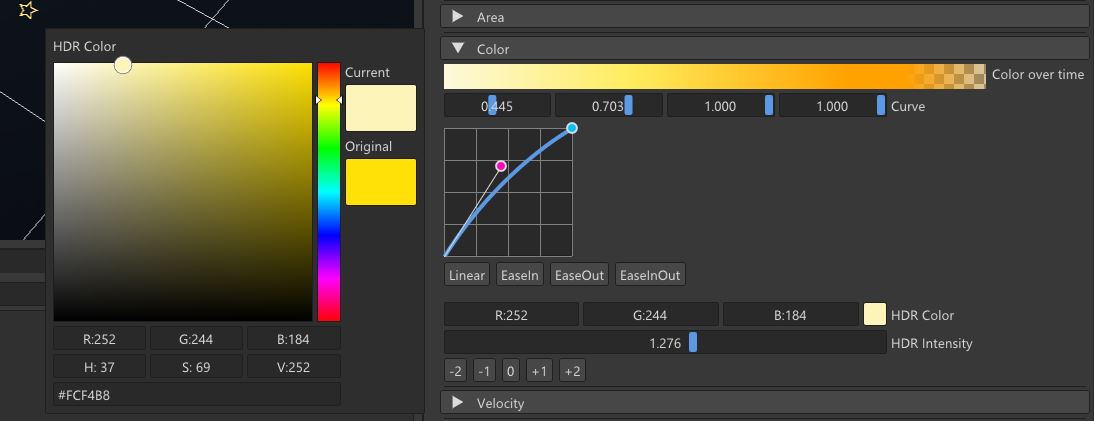
EmitterColor controls the particle’s colour and alpha throughout its lifetime. The system uses a gradient together with a Bezier curve. First, the particle’s lifetime is converted into a normalized value.
float scale =  1.f - particlePool[poolIndex].lifeTime / particlePool[poolIndex].startLifeTime;

float bezierScale = ImGui::BezierValue(scale, m_colorCurve);

m_colorOverTime.getColorAt(
    bezierScale,
    &particlePool[poolIndex].colorAndAlpha.x
);
The Bezier curve controls how quickly the particle moves through the colour gradient. This provides more control than a simple linear interpolation. For example, a particle can start transparent, quickly become visible, remain bright for most of its lifetime and then fade out near the end.
Animation
EmitterAnimation allows particles to use animated sprite sheets. The main parameters are:
- m_rows
- m_columns
- m_fps
- m_startFrame Each particle stores its current texture frame. During the update, the frame advances according to the configured FPS and deltaTime. The corresponding UV scale and offset are then calculated for rendering. This allows us to create animated effects such as explosions, fire or smoke using a single texture.
Render
EmitterRender contains the information required to render the particles. The main render parameters are:
- Orientation
- Layer
- Blend mode
Particles can be rendered with different orientations:
- Billboard
- Horizontal
- Vertical Different blend modes are also available:
- Alpha
- Additive
This allows different effects to use different rendering behaviours. For example, smoke can use alpha blending, while glowing particles can use additive blending.
Pre-Render
After all particles have been updated, ModuleParticleSystem::preRender() prepares them for the renderer. Particles are grouped by texture and layer. The animation module provides the UV scale and offset, while the render module provides the orientation, layer and blend mode. The system then creates ParticleEmitterCommands that contain the information required by the renderer.
| ALIVE PARTICLES -> GROUP BY TEXTURE -> GET ANIMATION UVs -> APPLY RENDER SETTINGS -> SORT BY LAYER -> ParticleEmitterCommand -> RENDER
Sorting by layer allows us to control the order in which particle groups are rendered. The system also keeps track of each particle’s distance to the camera. aliveParticle.first = Vector3::Distance(cameraPosition, position);
Final Result
After putting all these modules together, we have a particle system that can create a wide variety of effects without requiring a completely different implementation for each one.
The main advantage of the system is its modularity. An emitter can combine different modules depending on the effect we want to achieve. By changing parameters such as the spawn rate, lifetime, velocity, size, rotation, colour, animation and rendering mode, we can create very different results while using the same underlying architecture.
For example, a simple fire effect can be created by combining an area that controls where the particles spawn, a lifetime that determines how long they remain visible, a velocity that moves them upwards, a size curve that changes their scale, a colour gradient that controls their appearance and an animated sprite sheet to add visual variation.
The same system can then be reused to create smoke, sparks, dust, magic effects, explosions or environmental particles simply by changing the emitter configuration.
The particle pool also gives the system a predictable memory footprint and avoids continuously allocating and destroying particles during gameplay. When the pool reaches its limit, existing slots can be reused instead of creating additional objects.
At the rendering stage, particles are grouped by texture and layer before being converted into render commands. This keeps the particle simulation separated from the rendering process and allows the renderer to efficiently process the generated particle batches.
The result is a flexible foundation that can be used throughout the engine:
What started as a relatively simple collection of textured planes becomes a complete system capable of handling the entire particle lifecycle: spawning, initialization, simulation, animation, sorting and rendering.
This architecture gives us the foundation we need to continue improving the system. In Part 2, we will build on this implementation and cover some of the upgrades we introduced later, including gravity and other improvements that make the particle system more powerful and suitable for more complex effects.