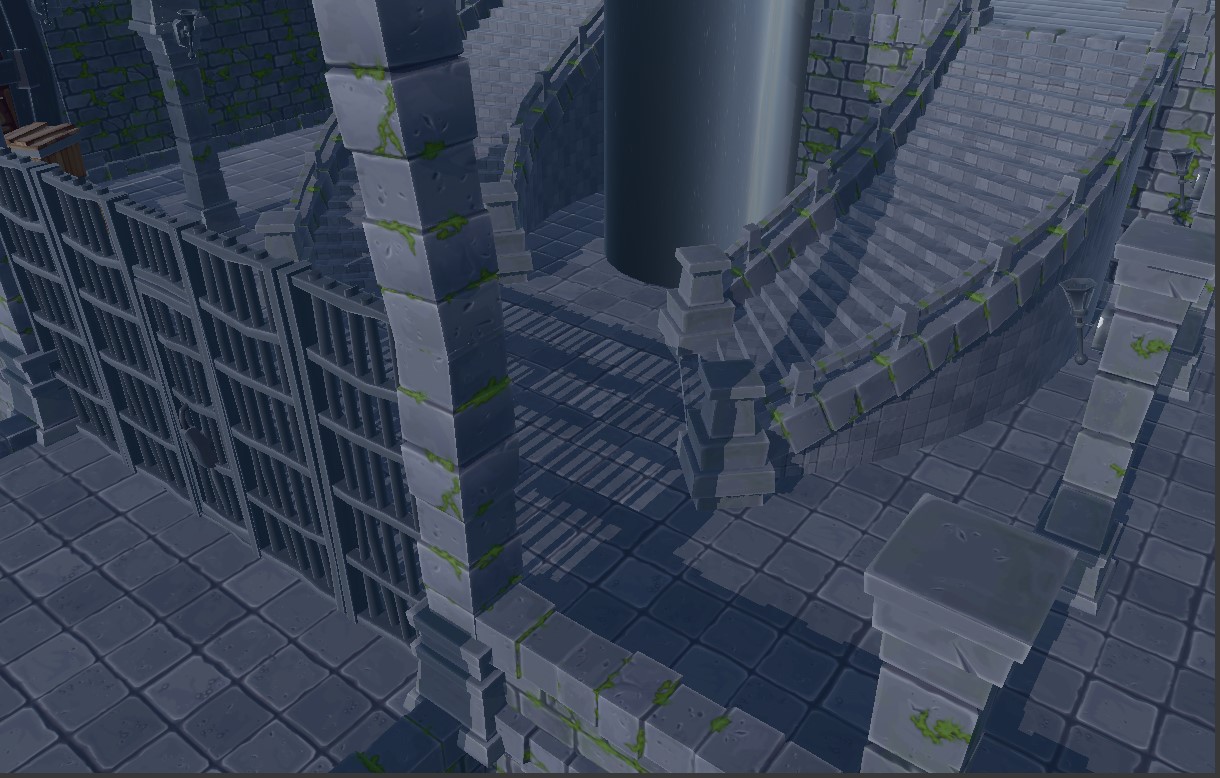
One of the rendering milestones we tackled in the engine was implementing the first version of real-time shadows using shadow mapping. At this stage, the goal was not to build an advanced shadow system with cascades, soft shadows, or complex filtering. The objective was much more focused: get the engine to render a shadow map from a directional light, use it during the lighting pass, and produce hard shadows in the scene. In other words: build the foundation first.
What we wanted to achieve
The task was focused on implementing the basic shadow mapping pipeline:
- create a depth texture that can also be sampled in a shader
- render the scene from the light’s point of view
- store the closest depth values into a shadow map
- pass the shadow data to the main mesh rendering pass
- compare each pixel against the shadow map during lighting
- apply the shadow only to direct lighting
- keep the implementation clean and scalable for future improvements Although the concept is simple, integrating it properly touched several parts of the renderer: resource creation, render pass ordering, shader bindings, lighting code, animated meshes, and cleanup.
##Creating the shadow map resource
The first step was adding support for a dedicated shadow map texture. In DirectX 12, the shadow map needs to work in two different ways during the frame. First, it is used as a depth target when rendering from the light. Later, it is used as a shader resource when the main lighting shader samples it. To support this, we created a specific shadow map resource using:
- R32_TYPELESS as the resource format
- D32_FLOAT as the depth stencil view format
- R32_FLOAT as the shader resource view format This allowed the same texture to be written as depth and then read in the pixel shader. We added this through a dedicated createShadowMap() function instead of modifying the normal depth buffer creation path. That kept the regular render surface depth buffer separate from the shadow system.
Adding a ShadowMapPass
After that, we introduced a new render pass: ShadowMapPass This pass is responsible for generating the shadow map. It has its own root signature, its own depth-only pipeline state, and a minimal vertex shader. The shadow pass does not output color. It only fills a depth buffer, so the pipeline uses:
- no render targets
- a depth stencil view
- depth testing enabled
- depth writing enabled
- no pixel shader The vertex shader only transforms mesh positions into light clip space. No materials, textures, normals, tangents, or lighting are needed at this stage. This was an important architectural decision. The shadow pass does one job only: generate depth from the light’s point of view.
##Preparing the light data
For this first implementation, we focused on directional light shadows. Each frame, ShadowMapPass searches for the first active directional light in the scene. From that light, it gets the light direction and builds a virtual camera looking at the visible part of the scene.
The pass then computes:
- light view matrix
- light projection matrix
- light view-projection matrix
- shadow bias
- shadow strength
- shadow enabled flag
These values are stored in a ShadowDataCB constant buffer and exposed to the rest of the renderer through ShadowFrameData. This keeps the shadow generation decoupled from the main mesh renderer. MeshRendererPass does not need to know how the shadow map was created. It only receives the final data required by the shader.
Rendering shadow casters
Once the shadow pass had its pipeline and light matrices, the next step was rendering the actual scene into the shadow map. The pass reuses the visible MeshRenderer list and renders each mesh using the depth-only shader. One important detail was supporting animated meshes correctly. The engine already had GPU and CPU skinned vertex buffers, so the shadow pass had to select the correct vertex buffer in the same way as the main mesh pass:
- GPU skinned vertex buffer when available
- CPU skinned fallback when needed
- static mesh vertex buffer otherwise
For skinned meshes, the vertices are already in world space, so the shadow pass uses only the light view-projection matrix. For static meshes, it uses the model matrix multiplied by the light view-projection matrix. This made animated characters cast shadows using their current animated pose instead of their bind pose.
Reordering the render pipeline
A key part of the implementation was changing the render order. Before shadow mapping, the render pipeline cleared and bound the main render target before running all scene passes. That was not suitable for shadow mapping, because the shadow pass needs to render to a different depth target before the main scene is drawn. The new order became:
- build the render context
- run the skinning compute pass
- run the shadow map pass
- bind and clear the main render target
- render the skybox and scene passes
- render debug, UI, and text
This order is important because skinned meshes must be updated before generating shadows, and the main scene must be rendered after the shadow map is available. We also had to fix lifetime and cleanup issues. The shadow map texture must be destroyed while the D3D12 command queue and resource systems are still valid. For that reason, ShadowMapPass is explicitly reset in ModuleRender::cleanUp().
Binding shadows to the main mesh pass
Once the shadow map was generated, the next step was making it available to the lighting shader. We extended MeshRendererPass so it could receive ShadowFrameData through the RenderContext. The shader bindings added were:
- b4 for ShadowDataCB
- t11 for the shadow map texture This was done without making MeshRendererPass depend directly on ShadowMapPass. The mesh renderer only receives a constant buffer address and a shader resource view handle. That keeps the system scalable. In the future, the source of the shadow data could change without rewriting the mesh renderer.
Applying shadows in the lighting shader
The actual shadow test happens in LightPixelShader.hlsl. For each pixel, the shader takes the world position and transforms it into light space using the light view-projection matrix. Then it converts the position from clip space to shadow map UV coordinates. After that, it samples the shadow map and compares:
- the current pixel depth from the light’s point of view
- the closest stored depth in the shadow map If the current pixel is farther away than the stored depth, it means another object is between the light and that pixel. The pixel is in shadow. A small bias is applied to reduce shadow acne. The shadow factor is then applied only to directional direct lighting. It is not applied to ambient or image-based lighting, because doing so would make the scene look too dark and physically less plausible for this first implementation.
Improving the light projection
The first working version used a fixed orthographic projection for the directional light. That was useful to get shadows working, but it was not very efficient. If the orthographic volume is too large, the scene uses only a small part of the shadow map. This wastes texture resolution and makes shadows look more pixelated. To improve this, we added a basic fitting step. The shadow pass now computes world-space bounds from the visible mesh renderers, transforms those bounds into light space, and builds a tighter orthographic projection around them. This gives the shadow map better resolution where it matters and reduces aliasing compared to the fixed projection. One important detail was the depth convention. In our view space, points in front of the camera/light use negative Z, so the light-space depth had to be converted using -lightSpacePoint.z before computing near and far distances.
Final result
By the end of this phase, the engine could:
- create a depth texture usable as a shadow map
- render visible meshes from a directional light
- support static and skinned shadow casters
- expose shadow data through the render context
- bind shadow data in the mesh renderer
- sample the shadow map in the lighting shader
- apply hard directional shadows to direct lighting
- improve shadow quality using a tighter light projection
In short, the engine now has a complete first version of directional shadow mapping.
What was still missing
This first phase focused on correctness and integration, not advanced shadow quality. There are still several improvements that could be added later:
- percentage-closer filtering for softer edges
- cascaded shadow maps for large outdoor scenes
- texel snapping to reduce shimmering
- better caster selection beyond only visible meshes
- per-light shadow settings
- editor controls and debug views for the shadow map Those are important features, but they are separate steps. The goal of this milestone was to build a clean foundation first.
Closing thoughts
This task was a good example of how a rendering feature often affects more than just shaders. Implementing shadow mapping required work across resource creation, render pass design, command list ordering, shader bindings, lighting, animation support, and cleanup. The most important part was keeping the system decoupled. ShadowMapPass generates the shadow map, RenderContext transports the data, and MeshRendererPass only binds what the shader needs. That makes the current implementation easier to understand and also gives us a solid base for future shadow features.