Every engine needs a way to manage assets. Textures, meshes, materials, animations, prefabs — they all need to be discovered, imported, cached, and loaded efficiently. This post walks through the architecture of our asset system: what problems it solves, how the pieces fit together, and why we made the decisions we did.
The problem space
When a file lands in the assets folder, several things need to happen. The engine has to detect it, figure out what kind of asset it is, convert it to a runtime-friendly binary format, persist that binary to disk, and track the relationship between the source file and the processed output. Then, when a scene or component needs that asset, it has to be loaded efficiently — ideally from cache.
Doing all of this in a maintainable way requires some structure. We broke the system into a few distinct responsibilities: scanning, importing, indexing, and caching.
Scanning and metadata
The entry point for the whole system is AssetScanner. On startup (and on refresh), it walks the assets folder and checks every file. For each asset, there is a companion .meta file that records a UID, a content hash (MD5), the source path, the file size, and any sub-asset dependencies.
The scanner uses file size as a fast first check before computing an MD5. If the size matches the stored value, the content almost certainly hasn’t changed and we skip the expensive hash. This matters at scale — scanning hundreds of assets on every startup adds up quickly.
If a source file has no .meta yet, or if the content hash differs, the file is queued for import. The scanner also runs its file checks in parallel using a thread pool, splitting files across IO tasks to keep startup times down.
Importers
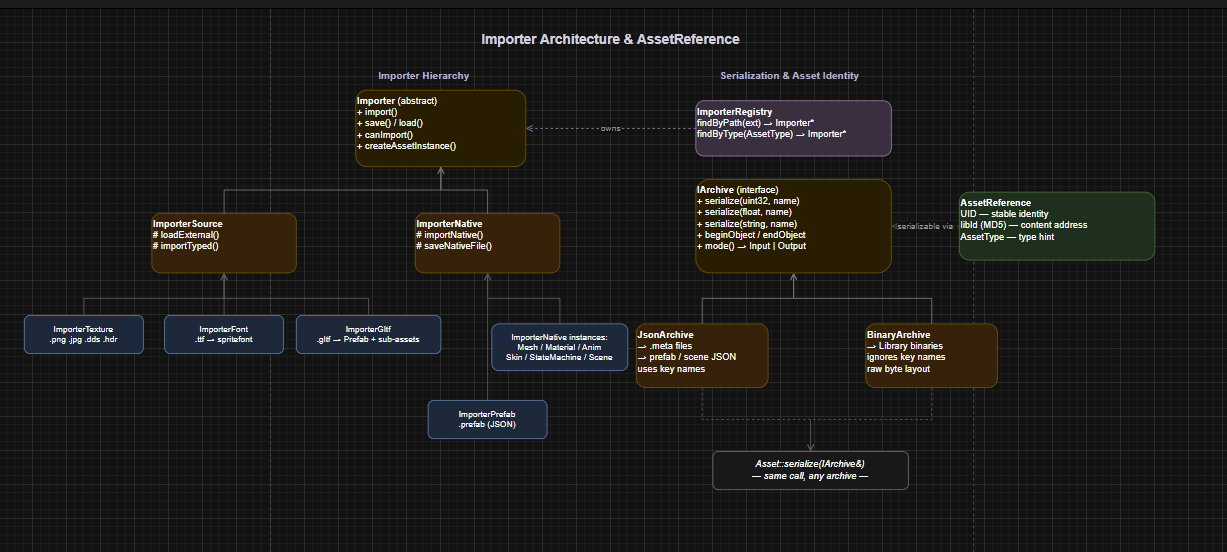
Once a file is queued, ModuleAssets hands it to the right importer. The ImporterRegistry holds a list of all importers and picks one by file extension.
Each importer is responsible for two things: reading a source format, and serializing the result to a binary blob for the library folder. The base template for this is ImporterSource<ExternalFormat, AssetFormat, TType>, which separates loading the external data (loadExternal) from converting it to the engine’s runtime type (importTyped). The binary save and load paths are shared — they just call serialize on the asset.
template<typename ExternalFormat, typename AssetFormat, AssetType TType>
class ImporterSource : public Importer
{
protected:
    virtual bool loadExternal(const std::filesystem::path& path, ExternalFormat& out) = 0;
    virtual void importTyped(const ExternalFormat& source, AssetFormat* dst) = 0;
};
For native engine formats (prefabs, materials, state machines), ImporterNative takes a simpler path — it just reads and writes JSON directly. No external format conversion needed.
The GLTF importer is the most complex one. A single .gltf file produces multiple sub-assets: meshes, materials, animations, skins, and a prefab hierarchy. Each sub-asset gets its own UID and binary, and the relationships are tracked as dependency records in the parent’s .meta file. This means reimporting a GLTF only regenerates the sub-assets that actually changed, identified by content hash comparison.
The library and content hashes
Rather than storing processed assets next to their source files, all binaries live in a flat Library/ folder. The filename of each binary is its MD5 hash.
This has a few advantages. If two different source files produce identical binary content, they share one binary. More importantly, it makes stale file cleanup straightforward — if the content hash of an asset changes on reimport, the old binary at the previous hash path can be safely deleted. No orphaned files accumulate over time.
std::filesystem::path getBinaryPath() const
{
    return std::filesystem::path(LIBRARY_FOLDER) / contentHash += ASSET_EXTENSION;
}
The index and Asset references
The AssetIndex is the in-memory map that connects UIDs to their metadata: source path, content hash, and asset type. It’s populated from .meta files on startup and kept up to date as assets are imported or removed.
Throughout the engine, assets are referred to by AssetReference — a small struct holding a UID, a content hash (libId), and a type. The UID is stable across reimports. The content hash tells the cache exactly which binary to load. Together they give us both stable identity and content-addressed loading.
struct AssetReference {
    UID       m_uid   = INVALID_UID;
    MD5Hash   m_libId = INVALID_ASSET_ID;
    AssetType m_type  = AssetType::UNKNOWN;
};
The cache and load path
AssetCache sits on top of a weak-reference cache. When an asset is loaded, a shared_ptr is stored in the cache keyed by UID. When nothing in the scene holds a reference to that asset, the weak pointer expires and the memory is freed automatically. No explicit unload calls needed in the common case.
The load path in ModuleAssets::load<T> follows a clear priority:
-
Check the cache first.
-
If the reference has a valid
libId, try loading the binary from the library folder. -
If that fails (binary missing or reference stale), fall back to reimporting the source file.
This means assets can always be recovered, even if the library folder is deleted — at the cost of a reimport.
Serialization abstraction
One thing that cuts across all of this is the IArchive interface. Both JsonArchive and BinaryArchive implement the same serialize overloads. Assets call serialize on an archive without knowing whether they’re writing JSON for a .meta file or binary for the library.
class IArchive {
public:
    virtual void serialize(uint32_t& val, const char* name = "") = 0;
    virtual void serialize(float& val,    const char* name = "") = 0;
    virtual void serialize(std::string& val, const char* name = "") = 0;
    // ...
};
JsonArchive uses name as a key and produces human-readable output. BinaryArchive ignores name entirely and writes raw bytes sequentially. The same Asset::serialize function works for both. This made it easy to add binary support later without touching any asset code — only the archive implementation changed.
Putting it together
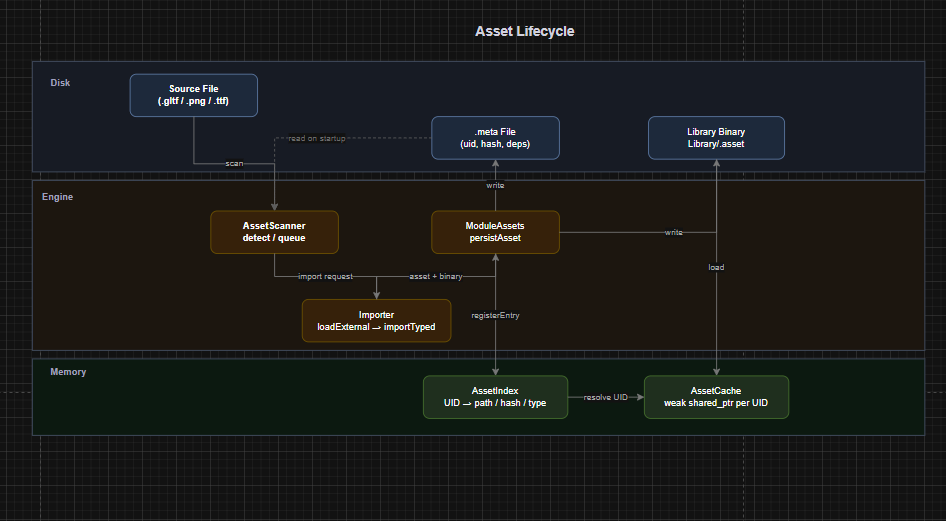
The full flow for a new asset file looks like this:
-
AssetScannerdetects the file has no.meta. -
It queues an import request.
-
ModuleAssetsfinds the right importer by extension. -
The importer reads the source, converts it, and serializes a binary blob.
-
ModuleAssetswrites the binary toLibrary/<contenthash>.asset. -
A
.metafile is written next to the source, recording the UID, content hash, and any sub-asset dependencies. -
The
AssetIndexis updated.
At runtime, loading an asset by AssetReference checks the cache, reads from the library binary if needed, and falls back to reimport if the binary is missing.
The architecture isn’t fancy, but it earns its complexity. Content-addressed storage, incremental reimport, parallel scanning, and a clean importer abstraction cover the real problems that come up as a project grows.