Controllers have motors in them. Small, dumb, spinning motors. And yet, when a game uses them well, you feel a sword swing in your palms, a heartbeat through your thumbs, an explosion in your whole hand. When it’s bad, you just feel a generic buzz every time anything happens. We don’t want that.
This post explains the haptics system: what it does, how it’s put together, and why we made the choices we did. No controller required to read, but you’ll probably wish you had one by the end
The short version:_ effects live in a JSON file you can edit without recompiling. The runtime mixes them per-frame, respects priorities, and sends them to hardware. Done. The rest of this post is the juicy details._
Architecture
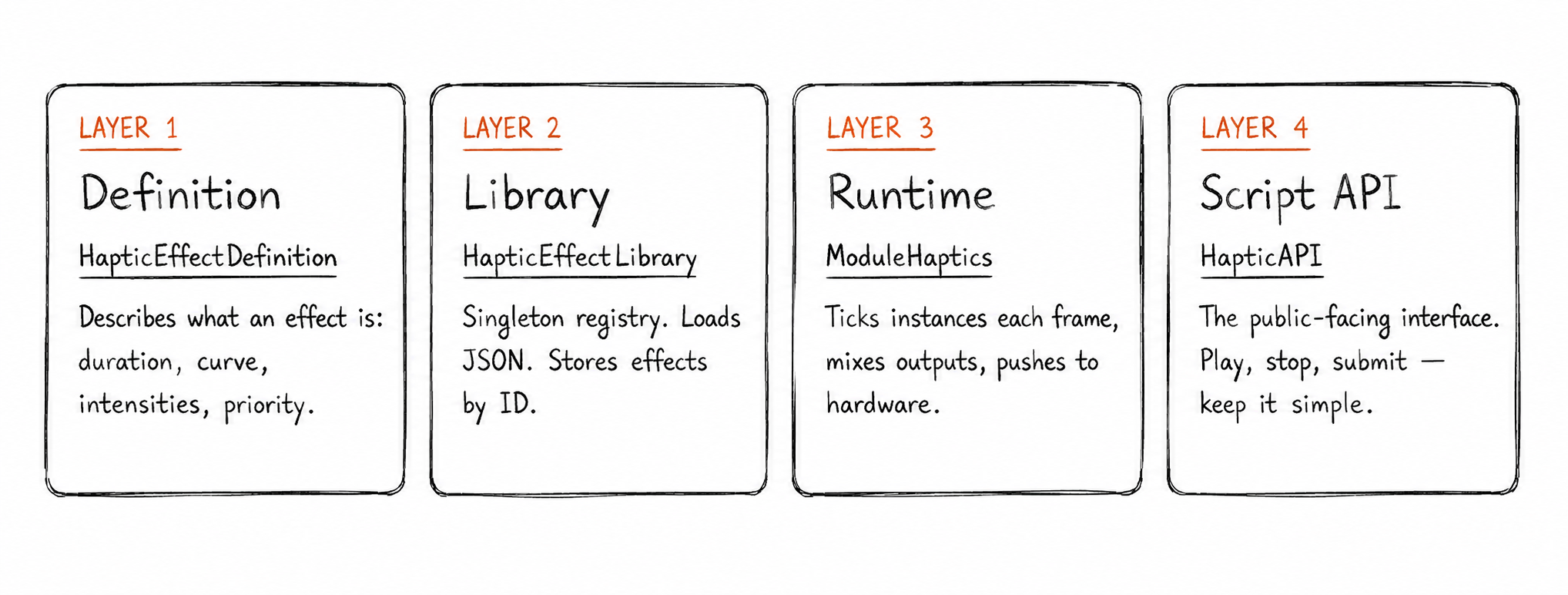
The system is split into four clean layers. Each knows as little as possible about the others, which is the only way these things stay maintainable when a deadline is coming.
From a gameplay script’s perspective, the whole thing looks like this:
//That's it. This is the whole API call
HapticAPI:playEffect("Imapact", playerIndex);
One line. No allocations to manage, no handles to track unless you need to cancel early. The complexity is entirely underneath
How It Was Built
The system didn’t arrive fully-formed, which would have been extremely convenient, but here we are. It went through three phases, each one solving a real problem the previous phase made painfully obvious.
Phase 1: Prove It Works End-to-End
The first goal was humble: get a rumble signal from code to controller. Nothing fancy. I created ModuleHaptics, wired it into the engine’s update loop, called SDL’s SDL_RumbleGamepad directly, and fired a hardcoded Impact effect on a button press. No library, no JSON, no priority system, just “does the controller shake?”
Phase 2: Designer Tooling(The JSON Layer)
Hardcoded values got old fast. Shockingly fast. So Phase 2 introduced HapticEffectLibrary and a proper JSON pipeline, moving effects out of C++ and into a data file where they belong.
The auto-generate-on-first-run behavior also landed here; if no file exists, the library writes the built-in presets to disk automatically, so there’s always something to start from rather than a blank stare. This is also when the helpers (makeImpact, makeExplosion, etc.) were written, ensuring defaults could be inspected and tweaked without anyone having to touch source code and break something at 11pm.
Phase 3: Script API & Runtime
The final phase exposed everything to gameplay scripts through HapticAPI. This meant adding playAtScale for distance-based feedback, submitAnonymous for on-the-fly effects, and a priority eviction system so the 16-instance pool never silently swallows an important effect into the void.
This phased approach meant the system was actually usable at every stage, not just eventually. Phase 1 was enough for a prototype. Phase 2 made it designer-friendly. Phase 3 made it production-ready. Nothing got thrown away between phases; each one extended the last, which is a nicer outcome than the usual “burn it all down and start over” arc.
How It Works (Under the Hood)
Every frame, ModuleHaptics does three things: tick active effects forward in time, mix their outputs together, and send them to the hardware. That’s the whole loop. It sounds simple because it is, the complexity is in how each step is handled.
The Instance Pool
At any given moment, up to 16 haptic effects can run. When a new effect comes in and the pool is full, the system doesn’t panic, it looks for the lowest-priority instance currently running and evicts it, but only if the incoming effect outranks it. A Critical explosion will always boot a Low engine hum. A Low footstep will not boot anything. If nothing can be evicted, the new effect is quietly dropped.
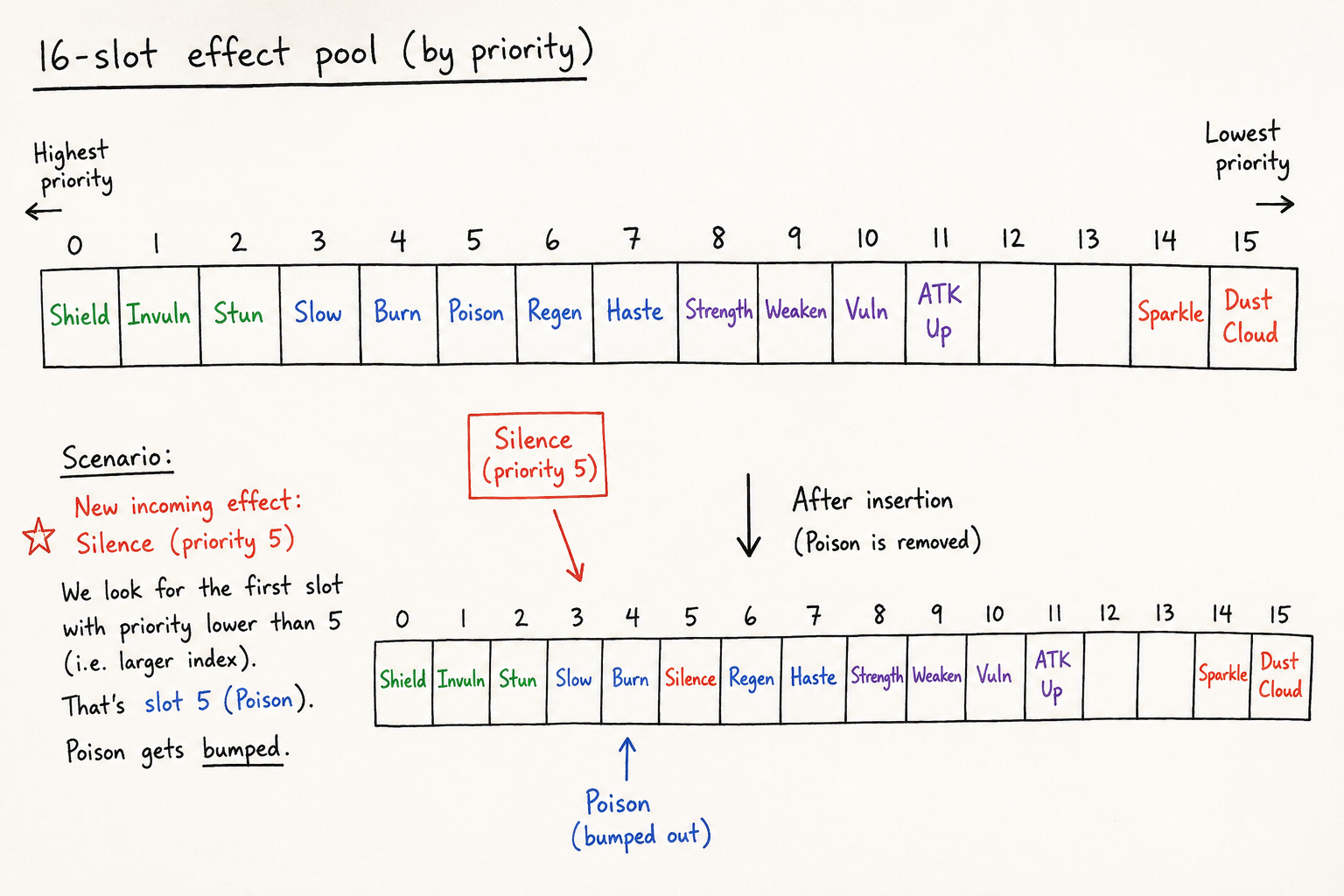
This matters more than it sounds. Without a priority system, important feedback gets swallowed during busy moments, exactly when you need it most.
Envelopes and Curves
Each active effect tracks how long it’s been alive against its total duration. From that, the system computes how loud it should be right now. Think of it like a volume shape over time, it can ramp up, hold, and fade out.
The “personality” of an effect comes from its curve. Here’s what the four built-ins actually feel like:

- Punch — instant peak, drops off sharply. Used for impacts and arrow shots.
- Exponential — fast initial drop, long rumbling tail. Used for explosions.
- Sustain — flat the whole way through. Used for looping effects like engine hum.
- Linear — fades evenly from start to finish.
Mixing
Once each effect’s intensity is calculated, they’re all added together per channel, left motor, right motor, left trigger, right trigger, and clamped so nothing goes over the limit. Two simultaneous impacts feel louder than one. Simple and predictable.
//This shows a mixing loop where it accumulates leftMotor, rightMotor etc. across instances,
float leftMotor = 0.0f;
float rightMotor = 0.0f;
float leftTrigger = 0.0f;
float rightTrigger = 0.0f;

for (const HapticInstance& inst : ps.instances) {
    if (!inst.alive || inst.delay > 0.0f)
        continue;

    const float envelope = evaluateEnvelope(inst);
    const float combined = envelope * inst.scale;

    leftMotor += inst.def->peak.leftMotor * combined;
    rightMotor += inst.def->peak.rightMotor * combined;
    leftTrigger += inst.def->peak.leftTrigger * combined;
    rightTrigger += inst.def->peak.rightTrigger * combined;
}
ps.leftMotor = clamp01(leftMotor);
ps.rightMotor = clamp01(rightMotor);
ps.leftTrigger = clamp01(leftTrigger);
ps.rightTrigger = clamp01(rightTrigger);
Hardware Output
The final mixed values get converted and fired at the hardware every frame via SDL. The call is deliberately short, it just tells the controller “keep doing this until the next frame tells you otherwise,” giving you a continuous updated signal rather than one-shot buzzes.
void ModuleHaptics::applyToHardware(int playerIndex) const{
    ModuleInput* input = app->getModuleInput();
    if (!input)
        return;
    SDL_Gamepad* gamepad = input->getSDLGamepad(playerIndex);
    if (!gamepad)
        return;

    const PlayerState& ps = m_players[playerIndex];
    const auto toU16 = [](float v) -> uint16_t {
            return static_cast<uint16_t>(v * 65535.0f);
        };
    SDL_RumbleGamepad(gamepad, toU16(ps.leftMotor), toU16(ps.rightMotor), 32);
    SDL_RumbleGamepadTriggers(gamepad, toU16(ps.leftTrigger), toU16(ps.rightTrigger), 32);
}
One small but important detail: the whole system runs on unscaled delta time. Slow-motion doesn’t turn your rumble into a weird low-frequency drone, and pausing cuts the output to zero without killing any active effects, they just wait silently until play resumes
Why JSON?(Stop Recompiling to change a float)
The first approach to this was hardcoded C++, which had a frustrating feedback loop. You’d change an intensity value, wait for the build, plug in a controller, feel it, decide it needs to be slightly stronger, and repeat. For something as subjective as feel, you might do this ten times for a single effect.
The JSON-driven approach kills that loop:
- No recompile needed. Edit game_effects.json, save, relaunch. The library reloads on startup.
- Non-programmers can tune effects. Designers can open the file in any text editor and adjust duration or leftMotor intensity, zero C++ required.
- Effects stay out of game logic. Scripts call effects by name. The actual numbers live in one data file, not scattered across gameplay code.
- Auto-generated on the first run. If game_effects.json doesn’t exist, the system writes it from built-in presets. You never start from a blank file.
A minimal effect in JSON looks like this:
{
  "id": "Footstep",
  "duration": 0.06,
  "attack": 0.005,
  "curve": "Punch",
  "priority": "Low",
  "peak": {
    "leftMotor": 0.25,
    "rightMotor": 0.1
  }
}
JSON handles static data. C++ handles dynamic behavior. The two complement each other.
Closing Thoughts
Haptics are one of those systems that’s invisible when it works and painfully obvious when it doesn’t. Nobody writes a review saying “excellent rumble patterns.” But they absolutely notice when every hit feels the same, or when the controller does nothing during a moment that should be needed.
The goal here was a system that’s easy to use from code, easy to tune without code, and expressive enough to handle everything from a quiet UI tap to a full procedural heartbeat. Whether it achieved that, well, that’s what playtesting is for.